
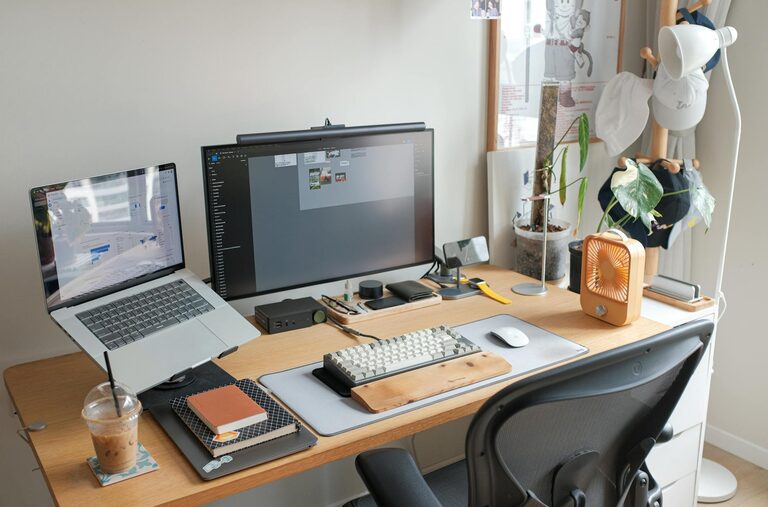
Creating a home workspace that is both relaxing and productive can transform your work-from-home experience. Whether you are zooming between meetings or focusing on deep work, the right environment makes all the difference. Here are practical tips to help you set up a space that feels inviting and keeps you focused throughout the day.
Choose the Right Location
Selecting the proper spot in your home is the first step toward a productive workspace.
– Quiet and Private: Pick a quiet corner or room away from noise and distractions.
– Natural Light: Position your desk near a window to enjoy natural light, which can increase energy and improve your mood.
– Good Ventilation: A well-ventilated area helps keep the air fresh, aiding concentration.
If space is limited, try using room dividers or screens to create a visual separation.
Invest in Comfortable Furniture
Comfort is key since you’ll spend hours at your desk.
– Ergonomic Chair: Choose a chair that supports your back and encourages good posture.
– Adjustable Desk: Consider a desk with adjustable height to switch between sitting and standing, if possible.
– Plenty of Surface Area: Ensure your desk has enough space for your computer, notebooks, and other essentials without clutter.
Organize and Declutter
A tidy workspace reduces stress and distractions.
– Storage Solutions: Use shelves, drawers, or organizers to keep supplies out of sight but within reach.
– Cable Management: Tidy up cords using clips or cable sleeves to prevent tangles.
– Daily Reset: Spend a few minutes at the end of each day clearing and organizing your desk.
Personalize with Calming Elements
Adding small touches can make your workspace more inviting and relaxing.
– Plants: Greenery adds a natural element and can improve air quality.
– Artwork or Photos: Display images that inspire or soothe you.
– Soft Lighting: Use warm lamps or fairy lights instead of harsh overhead lighting to create a cozy atmosphere.
Manage Noise Efficiently
Sound plays a big role in focus and relaxation.
– Noise-Canceling Headphones: These can block distractions when the environment gets noisy.
– White Noise Machines or Apps: Background noise like rain sounds or gentle music can help concentration.
– Soundproofing: Consider rugs, curtains, or foam panels to dampen loud sounds in your space.
Establish Work Boundaries
To maintain productivity, it is important to set clear work limits.
– Designate Work Hours: Stick to a schedule just like you would in an office.
– Break Space: Have a separate place to pause and recharge away from your desk.
– Digital Boundaries: Turn off non-essential notifications during focused work time.
Optimize Technology Setup
Efficient tech arrangements can save time and frustration.
– Reliable Internet: Ensure your connection is stable to avoid interruptions.
– Ergonomic Accessories: Use an external keyboard, mouse, or monitor for better comfort.
– Task Management Tools: Utilize apps or calendars to stay on top of deadlines and meetings.
Incorporate Movement and Breaks
Staying physically active helps maintain energy and reduce stress.
– Stretch Breaks: Take short breaks every hour to stretch or walk around.
– Exercise Equipment: Keep small weights or resistance bands nearby for quick workouts.
– Mindfulness Practices: Incorporate breathing exercises or meditation to reset your focus.
Conclusion
Creating a relaxing and productive home workspace is achievable with thoughtful choices. By focusing on location, comfort, organization, and atmosphere, you can design a space that supports both your well-being and work goals. Remember, small changes can make a big impact on how you feel and perform throughout your day. Take the time to personalize your space and establish routines that help you thrive at home.