
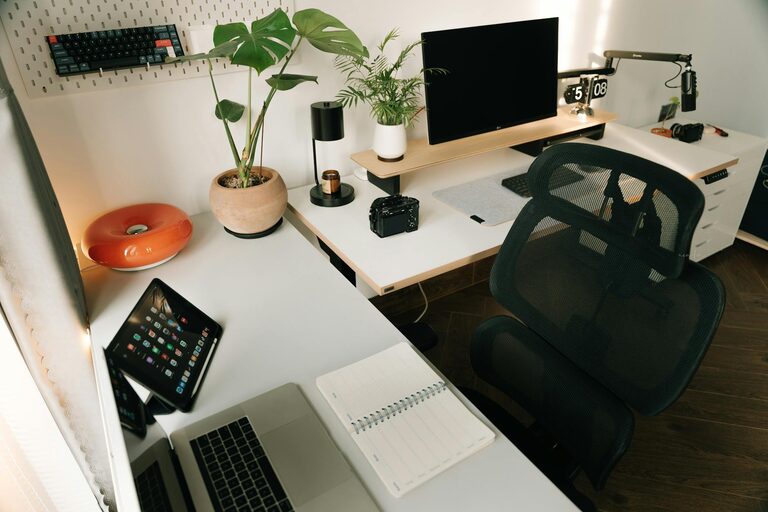
Working from home offers flexibility and convenience but can also present challenges when it comes to staying focused and productive. One of the key factors to success is setting up a home workspace that is organized, comfortable, and tailored to your needs. Whether you have a dedicated room or a small corner in your living space, these tips will help you create a productive work environment where you can perform at your best.
Choose the Right Location
The first step in organizing a productive workspace is selecting a suitable spot in your home. Consider these factors:
– Natural Light: A space with good natural lighting can improve mood and reduce eye strain.
– Low Distractions: Choose a quiet area away from noisy appliances or heavy foot traffic.
– Space Availability: Ensure there is enough room for your desk, chair, and any equipment you need.
If a permanent room isn’t an option, pick a spot that can be set up and packed away easily.
Invest in Comfortable and Functional Furniture
Comfort is crucial when you spend long hours working. Here’s what to look for:
– Ergonomic Chair: A chair that supports your lower back and encourages good posture will help prevent discomfort.
– Desk Size and Height: Your desk should fit your computer and supplies without feeling cramped. Adjustable desks are ideal for switching between sitting and standing.
– Storage Solutions: Incorporate drawers, shelves, or filing cabinets to keep your workspace clutter-free.
Declutter and Organize
An organized space leads to an organized mind. Try these strategies:
– Minimal Essentials: Only keep items you regularly use on your desk.
– Cable Management: Use clips, ties, or trays to keep cords tidy and out of the way.
– Daily Cleanup: Spend a few minutes at the end of each day clearing your workspace to start fresh tomorrow.
Organizers like trays, bins, and pen holders can help keep supplies sorted and accessible.
Personalize Your Workspace
Adding personal touches can make your workspace more inviting and motivating, but avoid overdoing it. Consider:
– Plants: Small plants can improve air quality and add color.
– Artwork or Photos: Visual elements that inspire you can boost morale.
– Inspirational Quotes: Place a motivational quote where you see it often.
Balance personalization with maintaining a professional and distraction-free environment.
Optimize Lighting
Proper lighting reduces eye strain and keeps you alert. Follow these tips:
– Natural Light: Position your desk near a window if possible, but avoid glare on your screen.
– Task Lighting: Use a desk lamp with adjustable brightness for focused work.
– Avoid Harsh Overhead Lighting: Soft, evenly distributed light is better than bright, direct lights.
Use Technology Wisely
Your tech setup plays a big role in productivity:
– Reliable Internet: Ensure your connection is stable to avoid interruptions during meetings or downloads.
– Dual Monitors: If your work involves multitasking, additional screens can increase efficiency.
– Headphones: Noise-cancelling headphones minimize distractions and improve focus.
Keep your devices charged and your software up to date.
Establish a Routine
Your workspace should encourage routines that promote productivity:
– Set Work Hours: Define clear start and end times to separate work from personal life.
– Take Breaks: Use techniques like the Pomodoro method to work in focused intervals with short breaks.
– Keep a To-Do List: Prioritize daily tasks to stay organized and motivated.
Maintain Good Ergonomics
Reducing strain and discomfort can improve focus:
– Monitor Height: Position your screen at eye level about an arm’s length away.
– Keyboard and Mouse Placement: Keep them at a comfortable height to prevent wrist strain.
– Posture: Sit with your back straight, feet flat on the floor, and arms supported.
Control Noise and Distractions
Minimizing unwanted noise helps concentration:
– Soundproofing: Use rugs, curtains, or foam panels to reduce echo.
– Background Music: Some people find gentle music or white noise helpful.
– Set Boundaries: Communicate with household members about your work schedule and space to avoid interruptions.
Keep Your Workspace Clean
Regular cleaning improves hygiene and comfort:
– Daily Wipe Down: Clean surfaces and devices to remove dust and germs.
– Organize Papers: Digitize documents to reduce paper clutter.
– Plan Deep Cleaning: Schedule weekly or monthly cleaning sessions for thorough maintenance.
—
By following these tips, you can create a home workspace that is both organized and inspiring. A well-arranged environment supports better focus, reduces stress, and helps you maintain a healthy work-life balance. Remember, the perfect setup is one that fits your personal workflow and lifestyle — don’t be afraid to adjust your space as your needs evolve. Happy organizing!